Get the MONEI Pay app for easy payments on the go


- Products
E-commerce payments
In-person payments
- Integrations
Payment methods
E-commerce platforms
- Businesses we Serve
- Resources
- Pricing
- Dashboard

Products
E-commerce payments›
In-person payments›
Omnichannel payments›
Payments security›
Other features›
Integrations
Payment methods›
E-commerce platforms›
Businesses we Serve
Resources
Pricing
WooCommerce payment gateway
MONEI's free payment gateway plugin for WooCommerce allows Spanish merchants to quickly and securely accept payments with multiple payment methods such as Bizum, cards, digital wallets (like Apple Pay and Google Pay), MultiBanco and MB Way, as well as BNPL payments.


Grow your online store by accepting Bizum and more payment methods
Bizum has just celebrated its 10th anniversary with more than 32 million users, and more than 1.6 million establishments that accept Bizum as a payment method.
Source: Bizum
Keep up with the competition and reach more customers with MONEI’s WooCommerce plugin. With a single integration, accept the following payment methods:
- Card (Visa, Mastercard, and more), with tokenization for saved cards
- Apple Pay
- Google Pay
- Bizum (Spain, automatically hidden for non-Spanish customers)
- PayPal
- Multibanco (Portugal, hidden for non-Portuguese customers, redirect only)
- MB Way (Portugal, hidden for non-Portuguese customers, redirect only)
- MONEI Flex card installments (Spain): shown automatically on eligible card payments once MONEI Flex is activated for your account
Advantages of MONEI's WooCommerce payment gateway plugin
Custom WooCommerce checkout page
Build trust, increase conversion rates, and avoid third-party redirects during the payment flow by customizing the appearance of your checkout page with your logo, brand colors, and company domain.
Leave security and compliance to us
MONEI is 3D Secure 2.0, PSD2, and PCI DSS Level 1 compliant, so you’ll never have to worry about payment security issues.
MONEI is an authorized payment institution registered with the Bank of Spain’s Registry of Payment Institutions under No. 6911.
Enable WooCommerce Express checkout
Allow customers to quickly pay for a product or service using pre-filled information from an existing account, with Apple Pay, Google Pay or PayPal.
WooCommerce Blocks
MONEI's plugin supports WooCommerce Blocks. To enable the modern checkout experience, you can replace the legacy shortcodes with the Cart and Checkout blocks.
Dynamic pricing
Sell more and spend less on transaction fees. With MONEI’s dynamic pricing model, your payment gateway grows with your business.
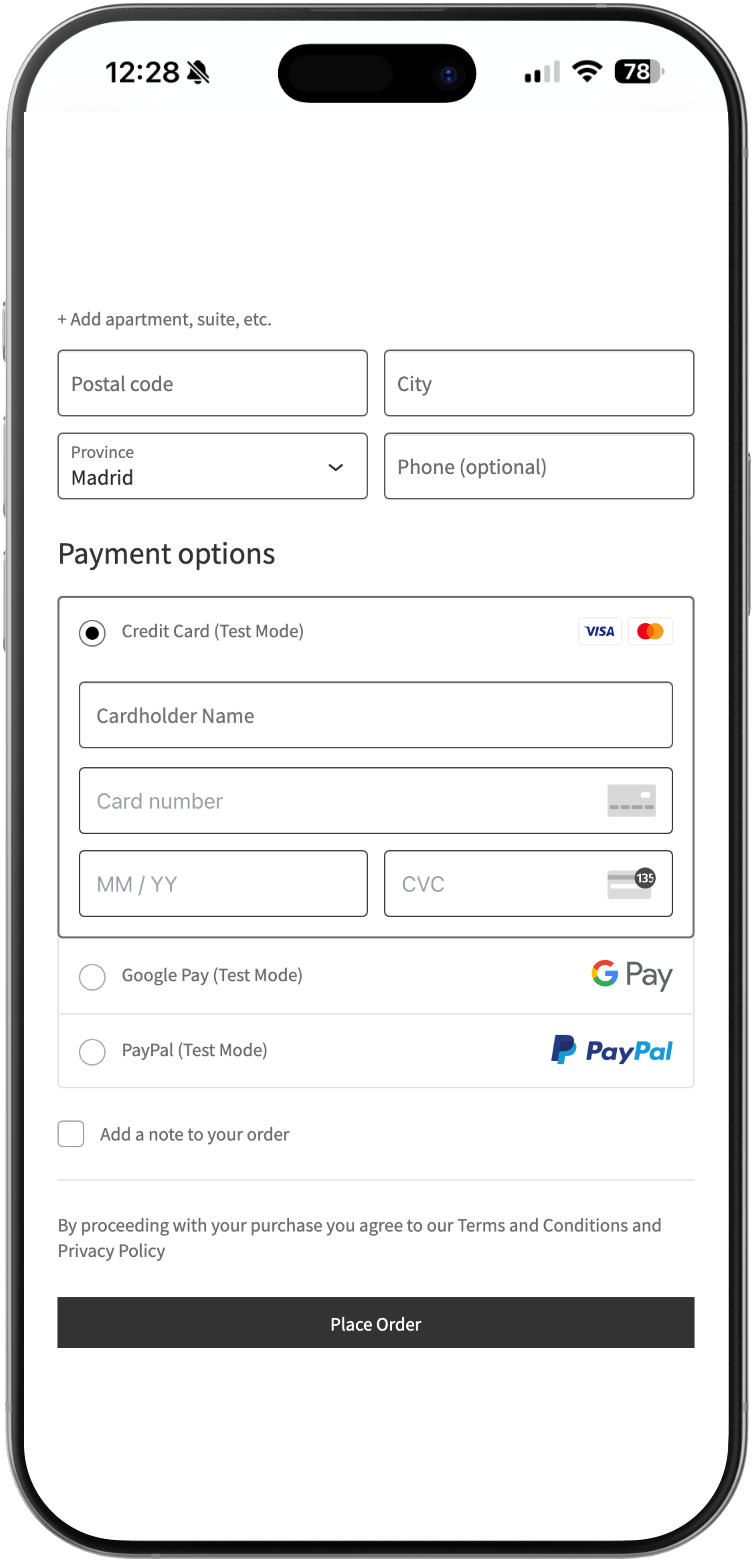
Easy integration
Use MONEI’s WooCommerce payment gateway plugin to connect with your e-commerce store in a few short steps. Wondering how it works? View a live WooCommerce demo here.
1
Install the MONEI plugin
In your WordPress dashboard, go to Plugins → Add New, search for MONEI, then click Install and Activate.
2
Copy your API credentials
In your MONEI Dashboard, go to Settings → API Access and copy your Account ID and API Key.
3
Connect your store
In WooCommerce, go to Settings → MONEI Settings, paste your Account ID and API Key, and choose test or live mode.
4
Enable your payment methods
Go to WooCommerce → Settings → Payments and enable the MONEI payment methods you want to offer, such as cards, Bizum, Apple Pay, Google Pay or PayPal.
5
Test and go live
Place a test order in test mode, then switch to live mode to start accepting real payments.


WooCommerce payment gateway FAQ
A WooCommerce payment gateway (like MONEI) is a service or software that facilitates the secure transfer of funds from a customer's bank account or credit card to your business bank account, enabling online transactions on a WooCommerce-powered e-commerce website.
When a customer makes a purchase through your WooCommerce store, the payment gateway (in this case, MONEI) encrypts the customer's payment details and securely transmits them to the payment processor. The payment processor then communicates with the customer's bank or credit card company to authorize and complete the transaction.
To set up MONEI’s payment gateway in your WooCommerce store, create an account. Then follow the WooCommerce plugin installation instructions.
No, but you don’t need one. Our payment gateway integrates with WooCommerce Subscriptions extension and Yith, so you can accept more subscription payment methods.
The fees vary depending on the payment method and they are dynamic. As your sales increase, transaction fees decrease in real-time.
Yes, you can configure multiple currencies in your MONEI account. You can select a default currency while you’re creating your account and then contact support to add more currencies.
Yes, customize your checkout page by adding your logo and branding, and use your company URL instead of redirecting customers to a third-party domain.
Settlement times generally range from one to seven days from the date of the transaction. But once you’re a verified and trusted merchant, you’ll be eligible for 1-day payment settlements.
