


How to accept Bizum payments on Stripe (Powered by MONEI)

You can accept Bizum payments inside Stripe's checkout, but Stripe doesn't process Bizum transactions itself, so you need a payment provider that does. This is because Bizum settles through Spain's banking network rather than Stripe's own acquiring infrastructure.
MONEI, however, holds a direct Bizum acquiring license, so it settles those funds to your account, while Stripe's Payment Element keeps the checkout experience, reporting, and reconciliation your team already uses.
In practice, adding Bizum to your Stripe payment stack with MONEI’s help means your Spanish customers see Bizum as one more payment option in your existing checkout, and every Bizum sale shows up in your Stripe dashboard right alongside your card transactions.
Content
- Why Stripe can't support Bizum natively
- What this means for your business
- What you need to add Bizum to your Stripe checkout
- How it works
- Bizum refunds with Stripe
- A note for developers
- Bring Bizum to our Stripe checkout with MONEI
Why Stripe can't support Bizum natively
Bizum isn't a global payment network the way cards or PayPal are; it's a Spanish system, built and run by Spanish banks, that settles funds directly between bank accounts. Accepting it requires a Bizum acquiring license, and that's not something Stripe handles on its own.
That's where MONEI fits in. MONEI holds a direct Bizum acquiring license, so it can do the piece Stripe can't, including authorizing and settling the Bizum payment itself. Stripe's Custom Payment Methods framework is what makes the handoff clean. It lets a payment method that Stripe doesn't process show up natively in the Payment Element, with the result reported back so it lands in Stripe's own records. You get Bizum in your checkout without replacing anything about how you already use Stripe.
What this means for your business
The main benefit of configuring Bizum in Stripe with MONEI is that Bizum doesn't become a second system to manage. Once a payment goes through, it behaves like any other Stripe transaction:
- One checkout, instead of multiple systems. Customers see Bizum as just another option inside the Stripe checkout you already have, so there’s nothing new for them to learn.
- Unified reporting. Bizum sales appear in the same Stripe dashboard as your card transactions, so you don’t need a separate login or export to review transactions.
- Simpler reconciliation. Your finance team can reconcile one set of records instead of stitching together two payment systems at the end of each month or accounting period.
- Meets local demand without local overhead. You can support a payment method a large share of Spanish customers prefer (over 31 million), without adding a new dashboard or process for your team to learn.
Note: In order to use this feature, your business must operate in Spain.
What you need to add Bizum to your Stripe checkout
Accepting Bizum through your Stripe checkout doesn't require any re-platforming because you're adding to your existing Stripe setup, not replacing it. Here's what has to be in place:
- A MONEI account with Bizum enabled, plus an API key. This is what gives you the Bizum acquiring license behind the scenes and authenticates your server to MONEI.
- A Stripe account with Payment Element access and Custom Payment Methods enabled. This is the framework that lets Bizum appear in your existing checkout.
- A server that can reach both APIs. You'll need two public URLs—one to bring customers back after they complete the Bizum payment, and one for MONEI to confirm the final result to your backend.
Bizum is currently available to customers with a bank account in Spain and Andorra, so it'll show up as an option for eligible customers automatically.
📌Learn more about how to configure Bizum in Stripe with MONEI
How it works
From the customer's side, paying for your products or services with Bizum feels like any other checkout option.
- Customer selects Bizum from the payment methods shown in your Stripe checkout.
- They're taken to a secure Bizum payment page, where they confirm (or enter) their phone number.
- Their banking app sends a notification to approve the payment, showing the same flow they'd use for any Bizum payment.
- They're returned to your site once the payment has processed.
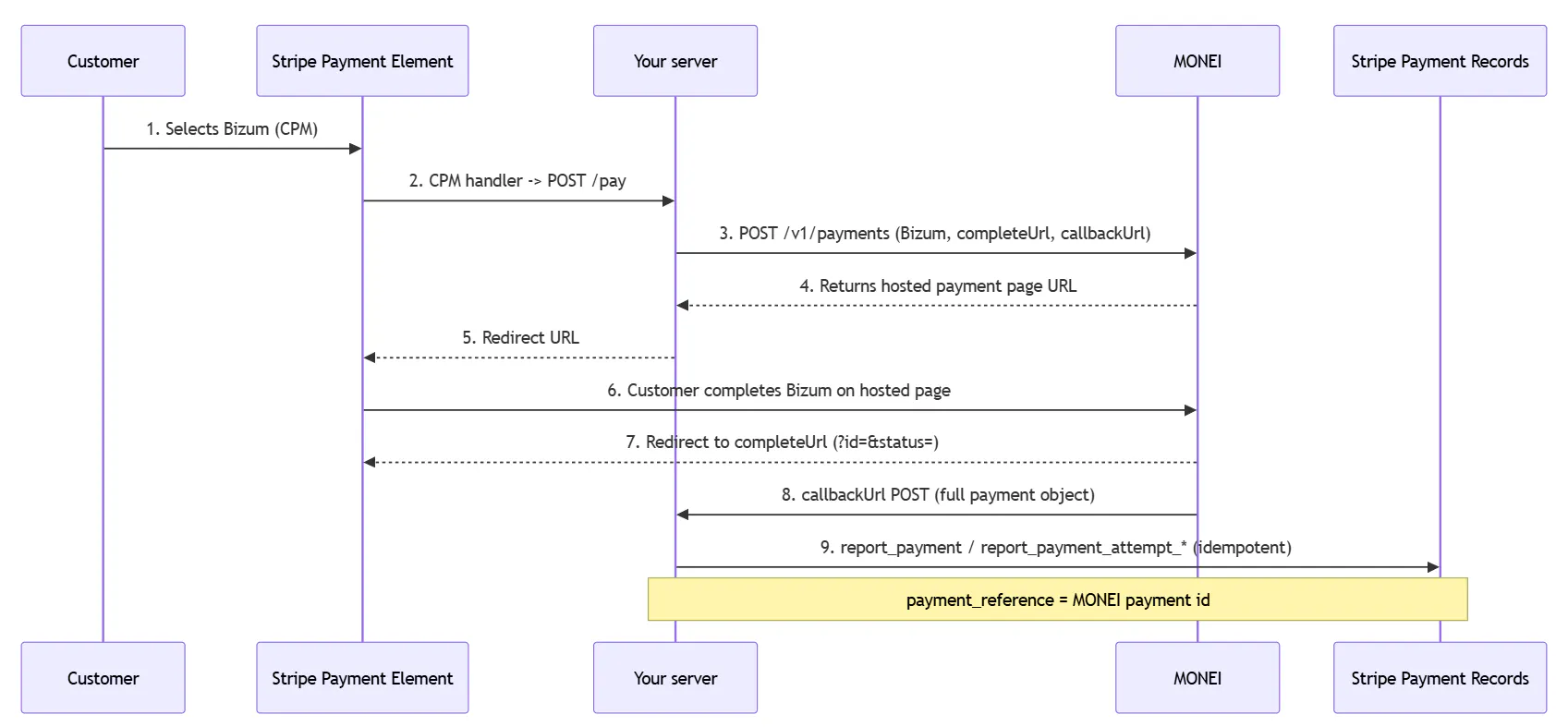
Behind the scenes, that confirmation runs on two tracks: the redirect back to your site happens right away, while a separate server-to-server message a few seconds later confirms the outcome and updates your Stripe records.
Bizum refunds with Stripe
Refunds work the same way payments do, so you don't need a separate process for Bizum. Whether it's a full or partial refund, you issue it through MONEI, and it's automatically reflected back in your Stripe records. Refunded Bizum transactions show up correctly alongside everything else in your reporting. Customers see the refunded amount return to their bank account in the same way as any other refund.
A note for developers
This integration requires some custom code. Stripe's Custom Payment Methods framework has no native "redirect to provider" mode, so your team needs a client-side handler and a server endpoint that creates the MONEI payment and reports the outcome back to Stripe.
The reconciliation piece is crucial. MONEI sends the final payment status to your server via callback, and that callback—not the customer-facing redirect—is the authoritative outcome your team should use to fulfill orders and report to Stripe. Use the MONEI payment ID as your idempotency key so retried or duplicate callbacks don't get reported twice.
A full working example covering the payment creation, redirect handling, and Stripe reporting for every status and refund case is available in MONEI's reference repository. For the complete technical walkthrough, consult the full integration guide.
Bring Bizum to our Stripe checkout with MONEI
Bizum is one of the top ways Spanish customers expect to pay—making it an important payment method to accept if you want to reach shoppers in Spain. Fortunately, there's now a clear path to offering it without stepping outside the Stripe setup you already run. MONEI handles the Bizum processing and settlement; Stripe keeps the checkout, the reporting, and the workflow your team knows.
Ready to add Bizum to your Stripe checkout without building the integration yourself? Open your MONEI account and get started. Or, if you're comparing payment providers altogether, see how MONEI stacks up as a Stripe alternative with Bizum built in from the start.

Frequently asked questions
Yes. Stripe's Custom Payment Methods framework lets Bizum appear in your Payment Element, while MONEI handles the actual processing and settlement under its own Bizum acquiring license.
You'll need a MONEI account with Bizum enabled, Custom Payment Methods access on your Stripe account, and a small amount of server-side code to connect the twe. Consult MONEI’s full integration guide for a complete technical walkthrough.
No. You don't need to apply for Bizum directly or set up a separate merchant relationship. Your MONEI account is what provides the Bizum acquiring license.
Not entirely. Stripe requires a client-side handler for any custom payment method, so some development work is needed on your end. If you'd rather avoid that, MONEI also supports Bizum directly on several e-commerce platforms with no code required. Get in touch to check if yours qualifies.

Alexis Damen
Alexis Damen is a former Shopify merchant turned content marketer. Here, she breaks down complex topics about payments, e-commerce, and retail to help you succeed (with MONEI as your payments partner, of course).